CASE STUDY / DEVELOPER TOOLS
PromptVault Pro
A more deliberate workflow for working with prompts.
Problem
Developers and AI practitioners accumulate dozens — sometimes hundreds — of carefully crafted prompts across projects. They're scattered in notes, docs, and chat histories with no way to organize, version, search, or optimize them. Switching windows to copy prompts breaks flow. I built a dedicated tool that makes prompt management instant and adds AI intelligence for optimization.
My Role & Responsibilities
- Created the entire product from concept to multi-platform shipping application
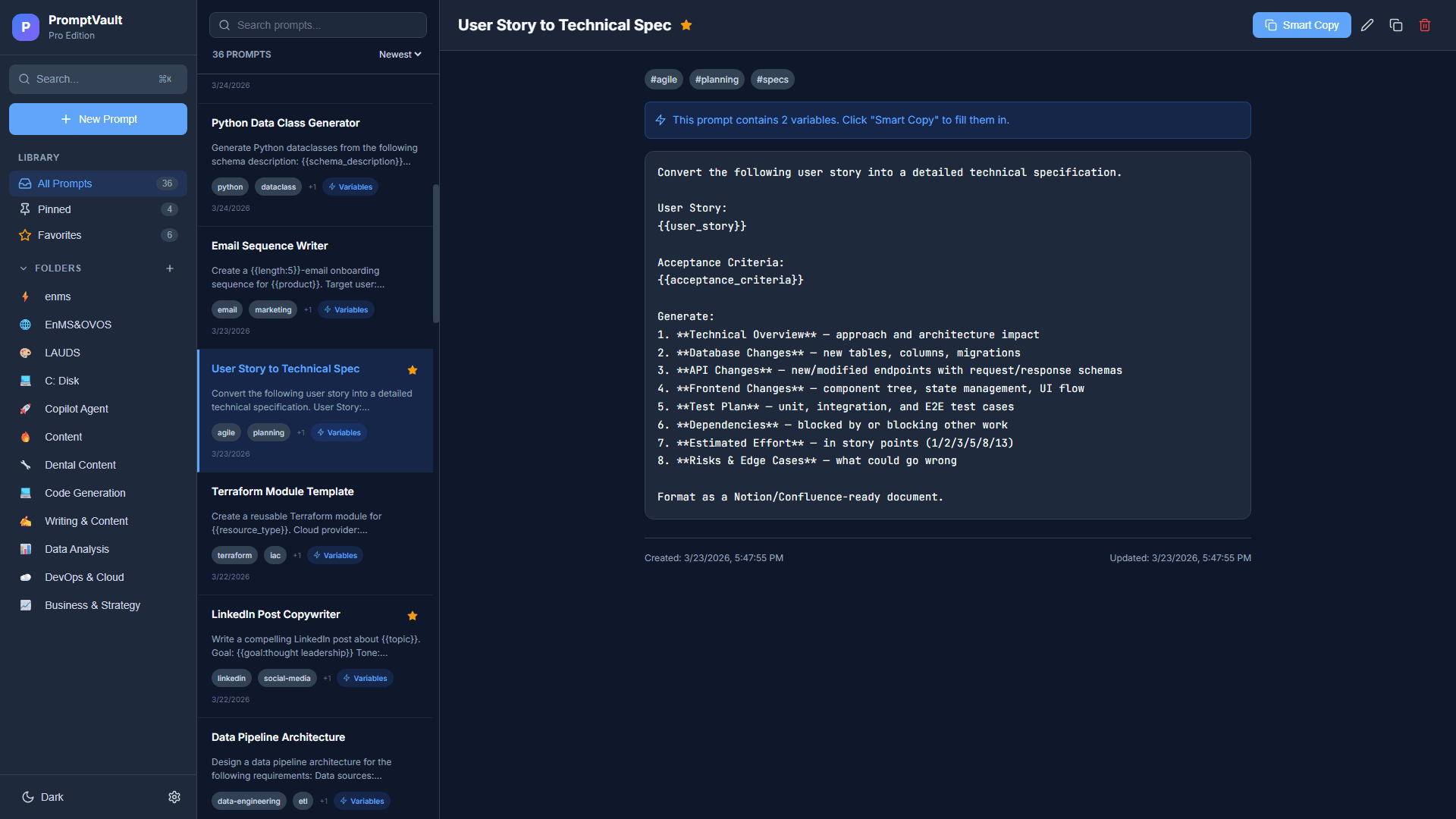
- Designed and built the React 18 + TypeScript web dashboard with Vite — folder-based organization, smart variables (
{{variable}}syntax), command palette (Ctrl+K), version history with one-click restore, dark/light mode - Built the Electron floating bubble for Windows — an always-on-top widget with global hotkey (
Ctrl+Shift+V), instant search, variable fill dialogs, and one-click copy - Implemented Express + SQLite REST backend (
/api/prompts,/api/folders,/api/export,/api/import, health endpoint) - Engineered Docker multi-stage deployment with Nginx reverse proxy and supervisord process management on Ubuntu server
- Designed the SQLite offline-first architecture — prompts are always available, even without internet
Mobile companion
The current repository also includes a React Native/Expo mobile client for Android and iOS. It uses Expo Router, Zustand, and AsyncStorage for offline prompt management, with folder organization, search, smart variables, copy actions, and documented delta-sync behavior.
The screenshots below cover the web and desktop product. Mobile implementation is documented in the repository; no app-store release or mobile usage metrics are claimed here.
Architecture
- Desktop Layer: Electron floating bubble with global hotkey, instant search, variable fill dialog, and one-click copy
- Web Layer: React + TypeScript dashboard with folders, command palette, version history, and smart variables
- API Layer: Express.js REST endpoints (CRUD, import/export, health)
- Data Layer: SQLite offline-first storage + JSON import/export backups
- Ops Layer: Docker multi-stage build, Nginx reverse proxy, supervisord process orchestration
Electron Bubble + React Dashboard + Expo Mobile
              ↓
          Express API
              ↓
    SQLite (offline-first) + Gemini
              ↓
       Docker + Nginx runtime
Tech Stack
- Frontend: React 18, TypeScript, Vite — custom CSS design system with dark/light theming
- Desktop: Electron — floating bubble with IPC, global hotkey (
Ctrl+Shift+V), system tray - Backend: Express.js — 11+ REST endpoints (CRUD, folders, export/import, health)
- Database: SQLite via
better-sqlite3— offline-first, zero-config, portable - Icons: Lucide React
- Deployment: Docker multi-stage build, Nginx reverse proxy, supervisord process management
- Language Mix: TypeScript 85.8%, CSS 12.2%
Platform Screenshots
Key Features
Web Dashboard
A power-user interface for managing your prompt library: folder-based organization with custom icons, command palette (Ctrl+K) for instant search and actions, version history (auto-saves last 5 versions with one-click restore), smart variables ({{variable}} syntax for dynamic prompts), pin-to-top favorites, and full JSON import/export.
Floating Bubble (Windows)
An always-on-top floating widget that lives on your desktop. Toggle with Ctrl+Shift+V, search your entire prompt library instantly, fill template variables via dialog, copy with one click — all without switching windows. Real-time sync with the web server.
Results & Impact
- Two-platform delivery — web for management, desktop bubble for instant access without context switching
- Offline-first by design — SQLite ensures prompts are always available, regardless of connectivity
- Production-ready deployment —
docker compose up -d --buildwith web UI on:2528and API on:2529 - Full product thinking — identified a real workflow bottleneck in AI-augmented development and built a complete solution from concept to installable desktop app
Challenges & Lessons Learned
- Electron performance — keeping the floating bubble lightweight required aggressive dependency management and lazy loading; minimized bundle size to stay responsive
- IPC architecture — designing reliable Electron main/renderer process communication with the Express backend required careful error handling and state synchronization
- Cross-device consistency — preserving fast UX between web and floating bubble required careful API caching and sync behavior
How AI/Agents Were Used
PromptVault is an AI-native productivity tool for LLM practitioners, even without tying value to one model vendor. Development was fully AI-augmented: I used GitHub Copilot and custom VS Code agents to scaffold the Express API, generate React components, design the Electron IPC layer, and write Docker/Nginx deployment config. All agent outputs were reviewed, tested, and hardened for production quality.
NEXT PROJECT